


Brainrot Playground
3.367.00 Reviews
App Specs
- Version
- 1.1.1
- Updated On
- License
- Free
- Downloads
- 5,000,000+
- Developer
- Tappy Game
- Categories
- Casual
- Platform
- Android
Screenshots
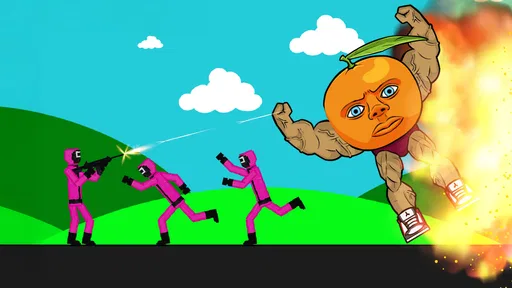

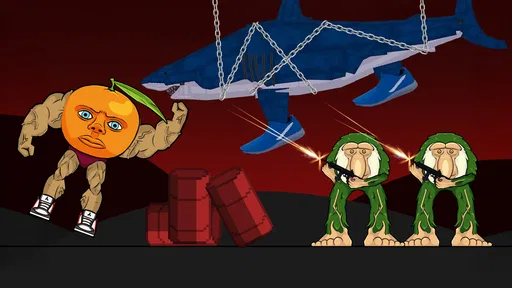
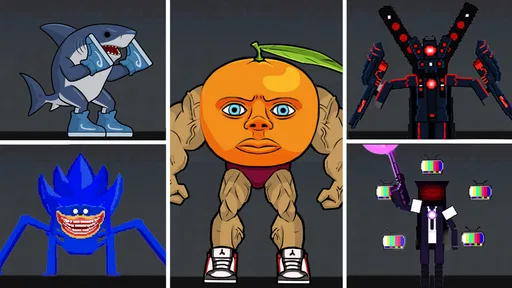
 Analysis by AppCompare
I judge a casual game by whether it gives me a good reason to return after the first curious tap. Brainrot Playground has an appealingly loose premise and a playful identity, but its strongest case is the promise of an open-ended place to experiment rather than a tightly explained challenge. I’d approach it as a light, creative diversion: potentially enjoyable when I want to poke around without committing to a long session, but not the best pick if I need a clearly structured campaign or precise goals.
A sandbox idea that depends on your mood
The name and store summary point toward a playground built around creativity and chaos, which sets a different expectation from a conventional puzzle game. I’d go in ready to explore and make my own fun, rather than expecting a sequence of carefully introduced levels. That distinction matters: players who enjoy improvising can find freedom in a loose setup, while anyone who wants the game to explain exactly what to do may find the experience less immediately satisfying.
That open-ended angle also gives the game a useful place in an everyday routine. If I have a few spare minutes while waiting for someone, I can treat it as a quick diversion rather than a task to finish. If I’m tired and want clear instructions, though, a focused match-based casual game would likely be a better fit. A sandbox works best when I’m in the mood to test ideas, not when I’m looking for a predictable reward loop.
What the rating suggests—and what it cannot settle
Tappy Game’s casual title is free to download, has passed five million installs, and holds an average rating of 3.1 from around 1,600 ratings. That combination tells me it has reached a sizable audience, but the modest average is a reason to keep expectations measured. It is not proof that every player will have a poor time; it does suggest that the loose, chaotic concept may not land equally well for everyone.
I would use that rating as a prompt to try it with a specific expectation: see whether the core playground idea appeals to me, rather than assuming broad popularity guarantees polish or depth. The game is marked Teen, and it is currently at version 1.0.1, so it makes sense to check the current store page and device compatibility before installing. It supports Android 7.0 or later. Optional in-app purchases range from $0.99 to $29.99 per item, so I’d be mindful of purchase prompts if I’m trying to keep a free download genuinely free.
Why the sandbox framing is the main attraction
The most interesting trade-off here is freedom versus direction. A sandbox can invite playful experimentation in a way that a standard high-score runner or a fixed puzzle grid usually does not. Rather than repeating one familiar action for a better score, I can approach the space as somewhere to try things and see what kind of amusing result emerges. That kind of play can be satisfying even when there is no big achievement waiting at the end.
It also means that the game’s appeal depends more on my own curiosity than on a checklist. A practical way to decide whether it suits me is to set a small personal goal before opening it: explore one part of the playground, try a few different interactions, or make a tiny scene that amuses me. If I enjoy inventing my own objective, the format has room to breathe. If I keep waiting for the game to supply a clear next step, that is a useful sign that a more structured casual game would suit me better.
Worth Reading Before You Choose

EA SPORTS FC Mobile 26 Is a Bigger Football Game, but It Takes Time

Flipboard Shows What News Apps Must Do Beyond the Feed

Switching to Android Auto Means Rethinking Your Driving Routine

Google Calendar Makes a Crowded Week Easier to Manage

Ludo King Makes the Most of the Minutes Between Plans

Baby Panda World Brings Quick Play to Modern Phones, but Its Game Library Feels Busy
How it fits beside other casual games
Compared with familiar casual alternatives, such as bite-sized puzzle games, endless runners, or quick score-chasing arcade titles, this game’s identity is its sandbox framing. Those alternatives usually make the loop obvious: solve the next board, last a little longer, or beat a score. That clarity makes them easy to pick up when I want a compact challenge. A playful sandbox offers a different reward: the enjoyment of exploring and making something happen without necessarily following a fixed path.
I would choose a puzzle game over this when I want a fair, repeatable test of logic, and an arcade game when I want immediate feedback and a clear personal-best target. I would choose this instead when I’m more interested in messing about than measuring progress. Neither style is automatically better; the useful question is whether I want the game to set the agenda or leave me room to invent one.
First Impressions: What's the Buzz About?
Brainrot Playground is like stepping into a digital wonderland. From the moment you open the app, you're greeted with a splash of colors and a playful vibe that’s hard to resist. It's almost like the app is saying, "Hey, let’s have some fun!" The interface is intuitive, making it easy to dive straight into the action without a steep learning curve. Whether you’re a tech whiz or just someone looking to kill some time, you’ll feel right at home here.
The Gameplay: A Mix of Fun and Challenge
What really sets this app apart is its eclectic mix of games and puzzles. Imagine a mashup of brain teasers, arcade-style challenges, and creative puzzles all wrapped up in one neat package. Each game is designed to test different skills – from quick thinking and strategy to creativity and problem-solving. I found myself getting lost in the variety, eagerly jumping from one game to the next.
The app features both single-player and multiplayer modes, so you can either go solo or challenge your friends. There’s something uniquely satisfying about outsmarting a buddy in a game you just discovered. Plus, the multiplayer option adds a social element that keeps things lively and competitive.
Design and Usability: A Feast for the Eyes
If I had to describe the design in one word, it would be "vibrant." The developers have clearly put a lot of thought into making the app visually appealing. The graphics are crisp, and the animations are smooth, adding to the overall enjoyment of the experience. Navigation is a breeze, thanks to the well-organized menus and straightforward icons.
Even if you’re not typically a fan of colorful interfaces, the app’s design is sure to win you over. It’s engaging without being overwhelming, striking the perfect balance between fun and functionality.
Features Galore: There’s More Than Meets the Eye
Beyond the games, it offers a slew of features that enhance the user experience. There's a daily challenge that keeps you coming back for more, offering rewards for completing tasks. These challenges range from beating a high score to solving a particularly tricky puzzle, adding an extra layer of excitement.
One of my favorite features is the customization options. You can personalize your avatar, choose different themes, and even unlock special items as you progress. It’s these little touches that make the app feel unique and engaging.
Who Will Get the Most Out of It?
I’d recommend it most to casual players who enjoy switching between activities and do not need every session to have a strict beginning and end. It may also work well as a shared conversation starter: when a friend is nearby, the multiplayer option gives you a reason to compare approaches rather than simply play alone. For that use, I’d keep the goal light—try a challenge together or see who can come up with the more entertaining result—so the social side stays relaxed instead of turning into a serious competition.
It is less suited to someone who wants a dependable progression system, a long narrative, or a transparent explanation of every mechanic before they start. Players who dislike visual busyness or prefer a calm, minimalist interface may also find the colorful presentation distracting. And if I’m choosing a game for a very short break where I want an instant, familiar loop, a simple runner or one-board puzzle is the safer choice; a playground asks for a little curiosity first.
A sensible way to try it
For a first session, I’d avoid treating every available option as something I must master. I’d spend a short stretch learning the layout, choose one activity that looks appealing, and then decide whether the freedom feels enjoyable or unfocused. That small trial is more useful than judging the whole game by its first few taps, since a sandbox’s appeal often depends on finding a personal way to use it.
I’d also decide in advance whether I’m comfortable with optional spending. Because the download is free but individual in-app purchases can reach $29.99, the simplest approach is to play without buying anything at first and only consider a purchase if I understand exactly what it adds and genuinely want it. That keeps the initial test low-commitment and avoids confusing a purchase prompt with a requirement to enjoy the game.
Final Thoughts: Is It Worth the Download?
After spending some quality time exploring it, I can confidently say it’s worth checking out if a loose, playful casual game sounds appealing. Whether you’re a casual gamer or someone who likes making up small challenges, there’s a plausible reason to give it a try. It’s an experience that doesn’t take itself too seriously, which can be refreshing when I want a break from games built around constant competition.
Sure, like any app, it has its quirks, and its open-ended feel will not suit every player. The combination of a sandbox premise and varied activities makes it more compelling for an exploratory mood than for a player seeking strict goals or a measured difficulty curve. If you’re looking for a fun way to pass some time and enjoy making your own little objectives, I’d give it a try; if you want a clearly guided challenge, I’d pick a more structured casual game instead. That is the choice I’d make before downloading, and it is what makes this a conditional recommendation rather than an automatic one.
Pros
- Engaging puzzles enhance cognitive skills.
- Intuitive interface for easy navigation.
- Regular updates with new challenges.
- No intrusive ads for uninterrupted play.
- Supports offline mode for convenience.
Cons
- Limited free levels before purchase needed.
- High battery usage during extended play.
- Occasional app crashes disrupt gaming.
- In-app purchases can be expensive.
- Some puzzles may feel repetitive.
FAQs for Brainrot Playground
What is Brainrot Playground and what can I do with it?
Brainrot Playground is an interactive app designed to challenge and stimulate your cognitive skills through a variety of engaging puzzles and games. Users can explore different levels of difficulty, track progress, and compete with friends. It’s perfect for anyone looking to enhance their mental agility and have fun in the process.
Is Brainrot Playground suitable for all ages?
Yes, Brainrot Playground is designed for users of all ages. It offers a range of puzzles and games that cater to both younger users looking for entertainment and adults seeking mental challenges. The app provides adjustable difficulty levels to ensure an appropriate experience for everyone.
Are there in-app purchases or subscriptions in Brainrot Playground?
Brainrot Playground includes optional in-app purchases. While the app provides a variety of free content, users can purchase additional features or levels to enhance their experience. Subscription options are also available, offering exclusive content and benefits to subscribers.
Does Brainrot Playground require an internet connection to play?
No, Brainrot Playground does not require a constant internet connection. Users can enjoy most of the games and puzzles offline. However, an internet connection may be needed for certain features, such as updates, leaderboards, or purchasing additional content.
How does Brainrot Playground ensure user privacy and data security?
Brainrot Playground prioritizes user privacy and data security by adhering to strict data protection policies. It collects minimal personal information and uses encryption to safeguard any data transmitted. Users can review the app’s privacy policy for detailed information on how their data is managed and protected.


